
🔍 QUICK ANSWER — How does text to image AI work? Text to image AI works in three steps: (1) A language model reads your text prompt and converts it into a mathematical representation called an embedding. (2) A diffusion model starts with random visual noise and gradually removes that noise — step by step — guided by the embedding, until a coherent image forms. (3) The finished image is rendered and delivered to you, usually in 2–30 seconds. You do not need to understand the math to use these tools. But knowing the basics helps you write better prompts and get better results. |
Why Understanding This Makes You Better at Using It
Most people treat AI image generators like a magic box — you type something in, a picture comes out, and sometimes it is great and sometimes it is not. That feels random and frustrating.
But it is not random at all. These tools follow a precise mathematical process, and once you understand that process at a high level, two things happen:
You start writing prompts that give the AI exactly the information it needs to produce great results
You stop being surprised when something goes wrong — and you know exactly how to fix it
This guide explains the technology in plain English, using everyday analogies. No maths, no code, no PhD required.
The Big Picture: From Words to Pixels in 3 Steps
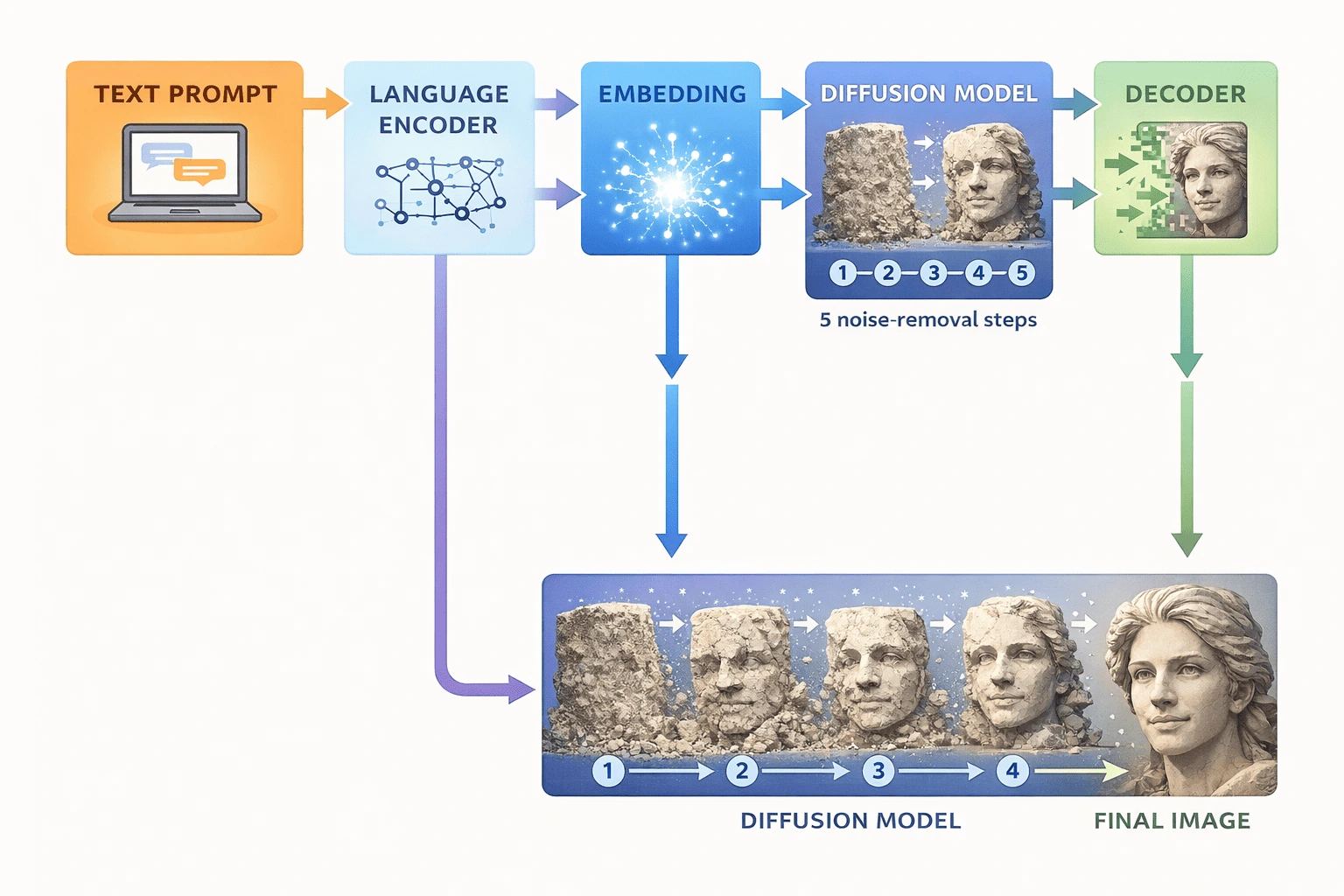
Before we go deep on any single technology, here is the entire process at a glance. Every text to image tool — whether it is DALL-E 3, Seedream, Ideogram, or Agent-Pix-It — follows this same fundamental pipeline:
1 | Reading Your Prompt — Language Understanding Your text is fed into a language model that converts it into a dense numerical representation called an embedding. Think of this as translating your words into a language the image-making part of the AI can actually read. |
2 | Guiding the Visual Process — The Diffusion Engine The embedding is handed to a diffusion model. This model starts with a canvas full of random noise — like TV static — and progressively cleans it up, step by step, using the embedding as a compass. Each step removes some noise and adds structure, guided by what your words described. |
3 | Rendering the Final Image — Decoding Once the denoising process is complete, a decoder translates the refined data into the actual pixel grid you see. This final image is then compressed, scaled to your requested resolution, and delivered to your screen. |
💡 The Sculptor Analogy: Imagine a sculptor who starts with a rough block of stone (pure noise) and chips away guided by a mental picture (your prompt). Each chisel stroke removes unwanted material and reveals more of the intended form. A diffusion model works the same way — except it takes 20–50 denoising steps instead of thousands of chisel strikes, and it finishes in seconds. |
Step 1: How the AI Reads Your Words
What Is an Embedding?
When you type "a red sports car parked on a rainy street at night," the AI does not read those words the way you do. Instead, a language model converts each word — and the relationships between words — into a list of numbers called a vector. This vector is your prompt's embedding.
The embedding is not just a translation of individual words. It captures meaning, context, and relationships. The embedding for "sports car" knows that it is related to "fast," "sleek," and "wheels" — not because anyone programmed that in, but because the model learned those associations from billions of examples during training.
🎯 Why This Matters for Your Prompts: Because the embedding captures meaning and relationships, vague prompts produce vague embeddings — and vague embeddings produce vague images. The more specific and concrete your language, the richer the embedding, and the better the AI can steer the image generation process toward what you actually want. |
CLIP: The Bridge Between Words and Images
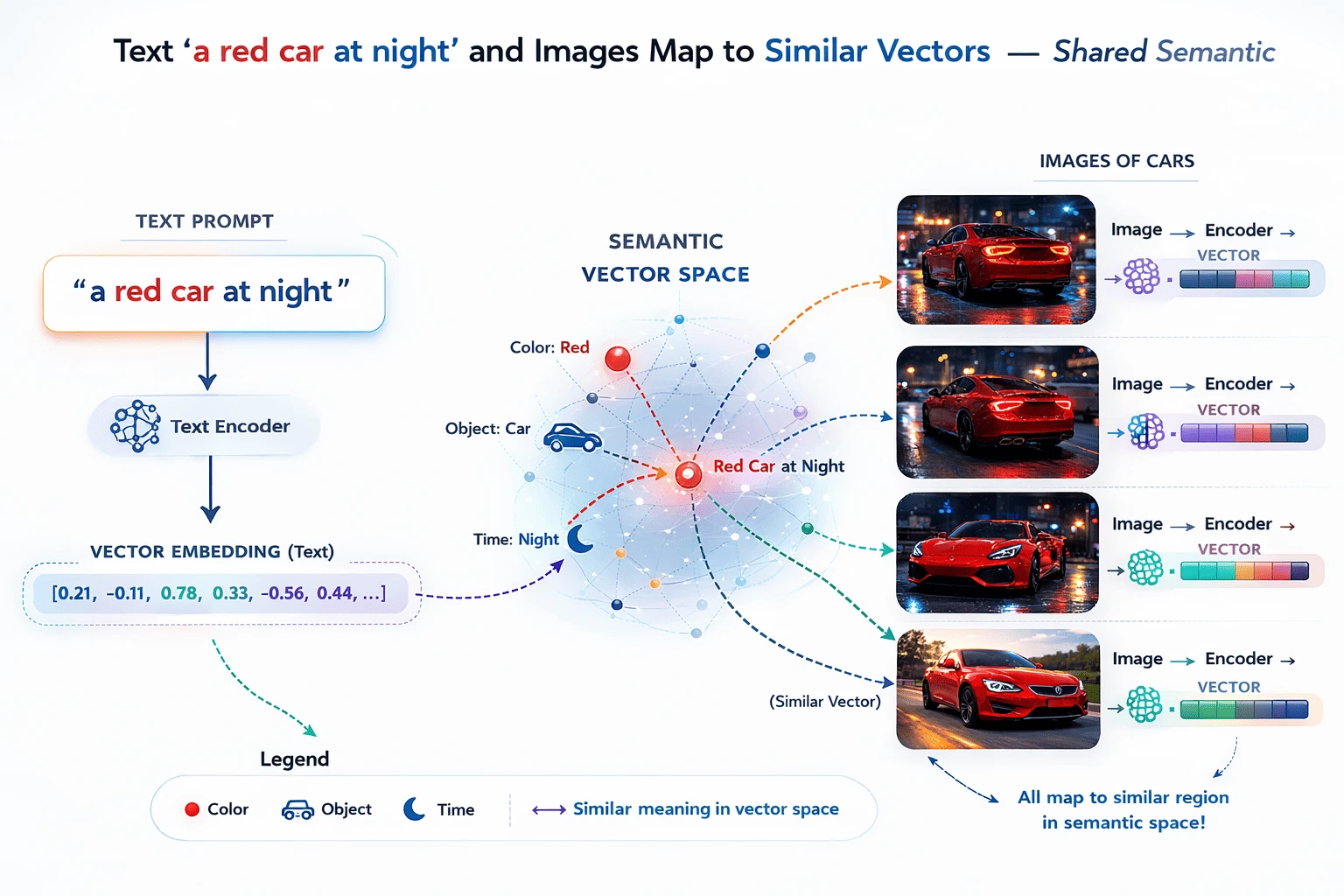
The specific model that most text-to-image tools use for this step is called CLIP (Contrastive Language–Image Pretraining), developed by OpenAI. CLIP was trained on hundreds of millions of image-and-caption pairs from the internet, learning to match descriptions to visual concepts.
What makes CLIP special is that it works in both directions. It can read a piece of text and produce a representation that lives in the same mathematical space as image representations. This shared space is what allows the language understanding and image generation parts of the AI to talk to each other.
In simpler terms: CLIP is the universal translator between your words and the visual world the AI operates in.
How Tools Like Agent-Pix-It Take This Further
Standard tools take your single prompt and convert it to one embedding. Kumba AI's Agent-Pix-It goes a step further — its agentic layer interprets your high-level creative brief, breaks it into multiple sub-prompts (e.g., background, foreground, lighting, style), generates separate embeddings for each, and coordinates them into a composite generation plan. This is why it produces more consistent, brief-accurate results without requiring you to be a prompt engineering expert.
Step 2: How Diffusion Models Generate Images
Where the Name "Diffusion" Comes From
The word "diffusion" comes from physics — it describes how particles spread out from a concentrated area into a more random distribution over time. Think of a drop of ink spreading in water.
In AI image generation, diffusion works in reverse. During training, the model learned to watch images get progressively buried in random noise — like that ink drop spreading until the original shape is invisible. During generation, it applies the reverse: starting from pure noise, it takes learned steps to "unspread" it back into a coherent image.
The Denoising Process — Step by Step
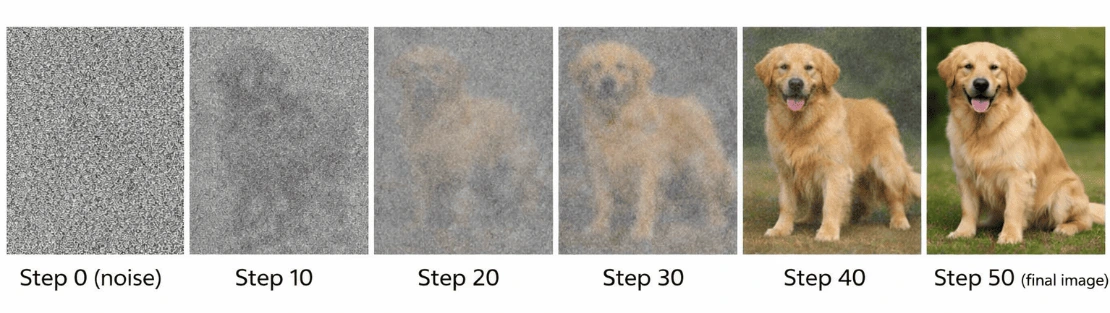
Here is what actually happens inside a diffusion model when you hit generate:
1 | Start with Pure Noise The process begins with a grid of random values — pure visual static. Every generation starts from this blank, random slate. This is why two runs with the same prompt produce different images (unless you lock the seed number). |
2 | The Model Predicts the Noise At each step, the model looks at the current noisy image and asks: "Given my prompt embedding, which parts of this image are noise and which parts are signal?" It predicts the noise component and subtracts it, revealing slightly more structure. |
3 | Guidance Keeps It On Track After each denoising step, classifier-free guidance checks whether the emerging image still matches the prompt embedding. If it is drifting — say, a car prompt starting to look like a truck — the guidance nudges the next step back toward the target. This is controlled by the CFG scale parameter. |
4 | Repeat 20–50 Times This predict-subtract-check cycle repeats 20 to 50 times depending on quality settings. More steps generally mean finer detail and better prompt adherence, but take longer. Most cloud tools run 30–50 steps automatically. |
5 | Final Decode to Pixels The result of the denoising process is not pixels — it is a compact latent representation. A decoder (the VAE — Variational Autoencoder) translates this back into the full-resolution pixel grid you see on screen. |
Latent Diffusion — Why Modern Tools Are Fast
Early diffusion models worked directly on full-resolution pixel grids, which was extremely slow and memory-intensive. Modern tools use latent diffusion, which performs the entire denoising process in a compressed mathematical space (the "latent space") that is 8x smaller than the actual image.
This is why DALL-E 3, Seedream, and Nano Banana can generate 1024×1024 images in seconds rather than minutes. They are not working with 1 million pixels during generation — they are working with roughly 16,000 latent values, then scaling up at the very end.
🔬 Latent Space Analogy: Think of the latent space like a compressed file. A 10MB photo file might compress to a 500KB JPEG without losing much visible quality. Latent diffusion works in the "compressed" space (tiny and fast), then decompresses at the end. The result looks just as good, but the generation process is dramatically faster and uses far less memory. |
What Is a Sampling Scheduler?
The sampling scheduler is the algorithm that decides how to take each denoising step — how big each step is, and how to balance quality versus speed. Different schedulers produce subtly different visual results even with identical prompts and seeds.
You will see scheduler names if you ever use Stable Diffusion: DDPM, Euler, DPM++ 2M Karras, DDIM. Consumer tools like DALL-E 3, Seedream, and Ideogram handle this automatically behind the scenes. You do not need to choose — but knowing it exists helps you understand why re-running the same prompt can sometimes produce slightly different results.
The Other Technologies You May Have Heard Of
GANs — The Previous Generation
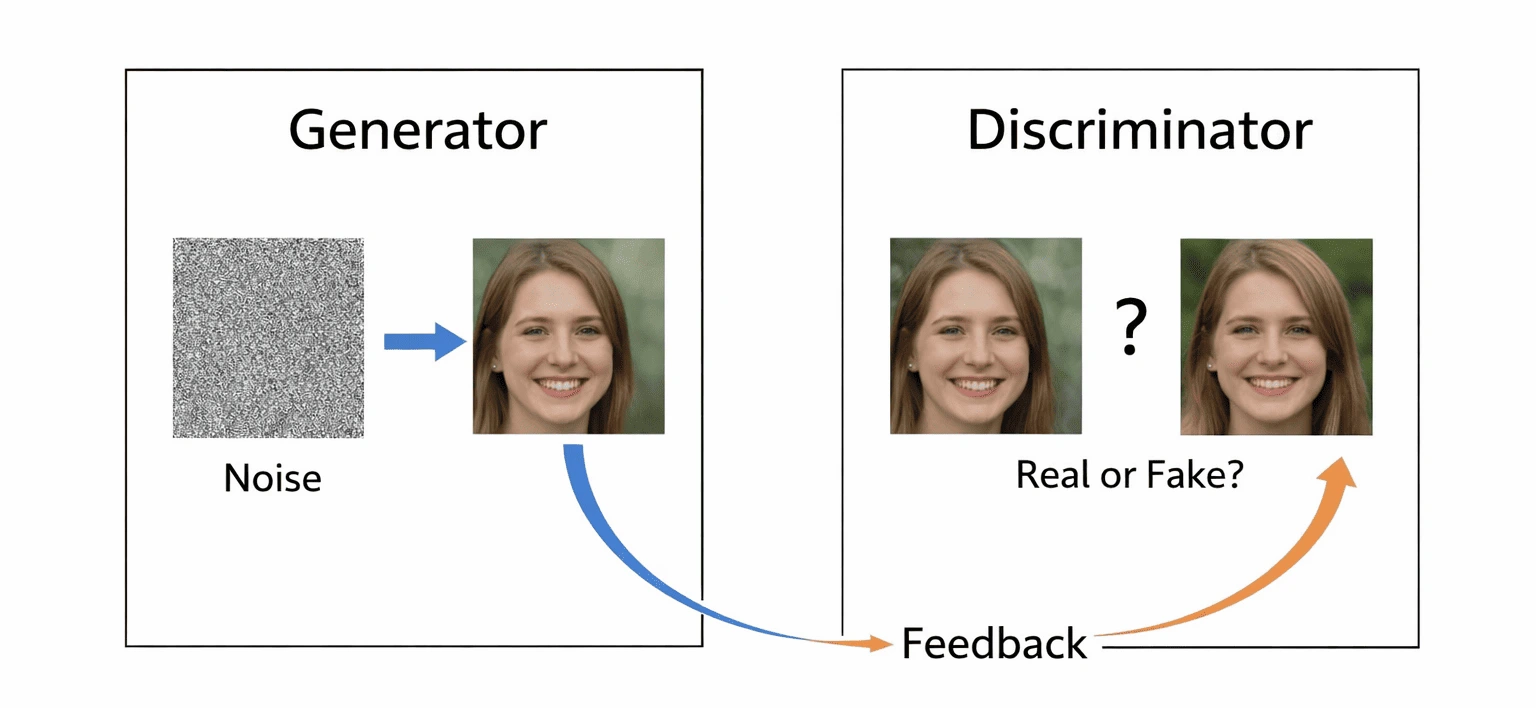
Before diffusion models took over, Generative Adversarial Networks (GANs) were the dominant architecture for AI image generation. A GAN is made up of two competing neural networks:
The Generator | The Discriminator |
Creates fake images from random noise | Tries to tell real images from fake ones |
Learns from the discriminator's feedback | Gets better as the generator improves |
Goal: fool the discriminator completely | Goal: never be fooled |
Result: increasingly realistic images | Result: increasingly tough quality bar |
This adversarial back-and-forth pushes both networks to improve simultaneously. GANs produced impressive results and were the backbone of early viral face generation tools like ThisPersonDoesNotExist.com.
However, GANs have largely been replaced by diffusion models because they suffer from mode collapse — a tendency to produce excellent images from a narrow range of outputs while ignoring the full diversity of the training data. Diffusion models produce much more varied and controllable outputs.
Transformers — The Language Intelligence Layer
Transformers are the architecture behind language AI — the same family of models that powers ChatGPT, Claude, and Gemini. In text-to-image systems, transformers do not generate the image directly. Instead, they handle the language understanding side of the equation.
The transformer reads your prompt, understands the relationships between words (that "golden" modifies "retriever," that "at night" modifies the whole scene), and produces the rich embedding that guides the diffusion model. Without a powerful transformer on the language side, even the best diffusion model would struggle to follow nuanced, multi-element prompts.
This is why prompt complexity matters — and why tools built on more powerful language models (like DALL-E 3, which benefits from GPT-4's language understanding) handle complex, multi-subject prompts better than older tools.
How They All Fit Together
Technology | Speed | Quality | Used In |
Diffusion Model | Medium-High | ⭐⭐⭐⭐⭐ Best quality | DALL-E 3, Nano Banana 2, Seedream, Ideogram, Agent-Pix-It |
GAN | Very Fast | ⭐⭐⭐ Good but limited | StyleGAN3, older tools |
Transformer | Variable | ⭐⭐⭐⭐ Strong composition | Components inside DALL-E, Ideogram |
✅ Key Takeaway: Every major text to image tool you use today (DALL-E 3, Seedream, Ideogram, Google Nano Banana, Agent-Pix-It) is built on diffusion models with transformer-based language understanding. GANs are largely historical at this point, though they still appear in niche applications like face generation and super-resolution. |
What Controls the Quality and Style of the Output?
Several technical parameters shape what comes out of a text-to-image tool. Most are handled automatically by consumer tools — but understanding them explains why outputs vary, and lets you use advanced tools more effectively.
1. The Prompt — Your Primary Control
The prompt is the single biggest factor in output quality. A vague prompt produces a vague embedding, which produces a vague image. Every additional specific detail you add — subject, environment, lighting, style, mood, composition — gives the diffusion model a more precise target to aim for. We cover this in depth in Blog 5: Prompt Engineering for AI Images.
2. The Seed — Reproducibility Control
Every generation starts from a random noise grid. The seed number is the specific starting point for that randomness. If you run the same prompt twice with different seeds, you get completely different images. If you lock the seed and change only one word in your prompt, you can see exactly what effect that one word has.
Pro tip: When you find a composition or face you like, note the seed number. Use the same seed with slightly varied prompts to iterate systematically rather than regenerating from scratch every time.
3. CFG Scale — How Closely It Follows Your Prompt
CFG Scale (Classifier-Free Guidance Scale) controls how strictly the model follows your prompt versus how much creative freedom it takes. It runs on a scale from 1 to 20 in most tools:
Low CFG (1–5): The model takes creative liberties — outputs are more varied and sometimes surprising, but less prompt-accurate
Medium CFG (7–9): The sweet spot for most use cases — good prompt adherence with natural-looking results
High CFG (12–20): Very strict prompt adherence — but outputs can look over-saturated or slightly unnatural
Most consumer tools (DALL-E 3, Nano Banana, Ideogram) handle CFG automatically. In Stable Diffusion and ComfyUI, you set it manually.
4. Steps — Quality vs. Speed Trade-off
The number of denoising steps controls how refined the output is. More steps generally means finer details and better prompt adherence — but takes longer. Most tools run 30–50 steps by default, which balances speed and quality well. Seedream's speed advantage partly comes from its highly optimized step count — it produces excellent results in fewer steps than most competitors.
5. Negative Prompts — Telling It What to Avoid
Negative prompts are a second text input where you list everything you do not want to appear in the image. They work by creating an anti-embedding that steers the denoising process away from those concepts.
For example, when generating portraits you might add: "blurry, distorted face, extra fingers, watermark, low quality, overexposed, cartoon" — all common failure modes that the negative prompt actively suppresses.
📝 Standard Negative Prompt Template: For portraits: "blurry, low resolution, distorted face, extra limbs, extra fingers, asymmetrical eyes, watermark, text overlay, cartoon, anime, painting" For photorealistic scenes: "blurry, out of focus, low quality, pixelated, compression artifacts, watermark, text, oversaturated, overexposed, underexposed, plastic look" For product photography: "shadow, reflection, background clutter, text, watermark, cropped, blurry, low quality, distorted proportions" |
Anatomy of a Great Prompt
Now that you understand how the AI reads your words, it makes sense why prompt structure matters so much. Each layer of information you add enriches the embedding and gives the diffusion model a clearer target.
Here is the full anatomy of a well-structured prompt, with each layer explained:
Layer | What It Does | Example |
Subject | Who or what is in the image? | A golden retriever puppy |
Action / State | What is the subject doing? | sitting in autumn leaves |
Environment | Where is the scene set? | in a sunlit forest clearing |
Style / Medium | What does it look like visually? | photorealistic, 35mm film |
Mood / Atmosphere | What feeling does it convey? | warm, peaceful, joyful |
Lighting | How is the scene lit? | soft afternoon golden hour light |
Composition | Camera angle or framing? | close-up portrait, shallow depth of field |
Technical Quality | Resolution or render quality? | 8K, ultra-detailed, sharp focus |
Putting It Together — Weak vs. Strong Prompt
❌ Weak Prompt | ✅ Strong Prompt |
A dog | A golden retriever puppy sitting in autumn leaves in a sunlit forest clearing, photorealistic, 35mm film, warm golden hour light, close-up portrait, shallow depth of field, 8K, ultra-detailed |
A city at night | Retro-futuristic neon cityscape at night, flying vehicles weaving through rain-slicked streets, magenta and cyan neon reflections on wet pavement, cinematic wide shot, hyperrealistic, atmospheric fog, 8K |
A coffee shop | Cozy independent coffee shop interior, exposed brick walls, warm Edison bulbs, barista crafting latte art, morning sunlight streaming through floor-to-ceiling windows, editorial lifestyle photography, 35mm film grain |
A logo | Minimalist tech startup logo, abstract geometric mark, deep navy and electric blue palette, clean sans-serif wordmark, white background, professional brand identity, vector style |
🎯 The Most Important Single Improvement You Can Make: If you only do one thing differently after reading this guide, add a lighting style to every prompt. Specifying 'soft natural light', 'golden hour', 'dramatic studio lighting', or 'overcast diffused light' has a bigger impact on perceived image quality than almost any other single addition. Lighting is how human eyes judge the realism of a scene — and AI models have learned this too. |
How the Architecture Differs Between Tools
All the tools in our 2026 guide share the same fundamental pipeline — but each makes different architectural choices that explain their strengths and weaknesses.
DALL-E 3 (OpenAI)
DALL-E 3 uses a diffusion model guided by OpenAI's GPT-4 language understanding. The GPT-4 integration is what gives it exceptional prompt adherence — GPT-4 can parse and "understand" complex, multi-part prompts better than most language encoders. It also uses a recaptioning technique during training: rather than using short, vague captions, OpenAI generated rich, detailed captions for all training images using GPT-4. This is why DALL-E 3 responds well to long, detailed prompts.
Google Nano Banana 2 (Gemini 3.1 Flash Image)
Nano Banana 2 is built on Google DeepMind's multimodal architecture, where image generation is deeply integrated with Gemini's real-time knowledge base. Its key architectural differentiator is grounding — it can generate images that are accurate to specific real-world subjects, current events, and factual contexts because it can query Gemini's knowledge during the generation process. This is fundamentally different from other tools, which generate purely from training data.
Seedream (ByteDance)
Seedream's speed advantage comes from ByteDance's proprietary optimizations to the latent diffusion process — including more efficient step scheduling and a highly optimized decoder that produces 4K output without proportional compute increases. Its multi-image consistency capability is achieved through a character consistency module that maintains semantic features (face, clothing, body proportions) across multiple simultaneous generations from the same reference.
Ideogram
Ideogram's text rendering capability is the result of a dedicated text synthesis pipeline that sits alongside the standard diffusion process. Rather than attempting to render text through the same denoising process used for visual elements (which struggles with the precision required for letterforms), Ideogram uses a specialized module that generates text as structured vector paths and composites them with the diffusion output. This is why it reliably produces clean, legible, stylized text when other tools produce garbled letters.
Agent-Pix-It (Kumba AI)
Agent-Pix-It adds an agentic orchestration layer on top of the generation process. Rather than a single prompt-to-image pipeline, it runs a planning stage (parsing the creative brief into sub-components), a generation stage (producing multiple candidate outputs), an evaluation stage (scoring outputs against the original brief using a vision-language model), and an iterative refinement stage (re-prompting based on evaluation scores). The generation engine itself uses a diffusion model, but the surrounding intelligence is what makes it produce brief-accurate results without manual prompt engineering.
5 Common Myths About How AI Image Generation Works
Now that you understand the actual process, let us clear up the most common misconceptions:
| Common Myth | The Reality |
❌ | MYTH: The AI "understands" what you mean the way a human does | REALITY: The AI maps your words to numerical patterns it learned during training. It does not reason or understand — it statistically predicts what pixels belong together based on your prompt. |
❌ | MYTH: The AI copies existing images from the internet | REALITY: The model learns statistical patterns from training data. It does not store or retrieve actual images — it generates entirely new pixels every time. |
❌ | MYTH: Better hardware always means better images | REALITY: Model architecture and training data quality matter more than raw compute. A well-trained smaller model can outperform a poorly trained larger one. |
❌ | MYTH: AI images are random and unpredictable | REALITY: With seed control and structured prompts, outputs are highly reproducible and predictable. Randomness is controllable. |
❌ | MYTH: The AI "tries" to make what you asked for | REALITY: There is no trying. The model executes a mathematical denoising process guided by your prompt embedding. The result is deterministic given the same seed and prompt. |
Why AI Images Sometimes Go Wrong — And How to Fix It
Understanding the technology makes failure modes predictable and fixable:
Problem: Distorted Hands and Faces
Why it happens: Human anatomy is extraordinarily complex. The model learned from billions of images where hands and faces were partially obscured, stylized, or photographed from unusual angles. When generating at unusual compositions, the statistical predictions for these regions become uncertain.
Fix: Add "sharp focus, detailed anatomy, photorealistic face" to your prompt and "distorted face, extra fingers, deformed hands" to your negative prompt. For portrait work, using Ideogram's style reference feature or DALL-E 3's follow-up editing often resolves specific anatomical issues.
Problem: The Image Looks Nothing Like My Prompt
Why it happens: The prompt embedding is too vague, contradictory, or contains concepts the model rarely saw together during training. The model defaults to its strongest learned associations rather than your specific intent.
Fix: Be more specific. Break complex scenes into explicit components. Avoid abstract instructions like "beautiful" or "amazing" — describe what beautiful means visually ("golden light, soft bokeh, warm colors").
Problem: The Style Is Not What I Wanted
Why it happens: Without a style specification, the model picks the style that the prompt statistics most strongly suggest — often a generic "internet photo" aesthetic.
Fix: Always specify a medium or style: "oil painting," "digital illustration," "DSLR photography," "watercolor," "3D render." This is one of the highest-leverage additions you can make to any prompt.
Problem: Text in the Image Is Unreadable
Why it happens: Standard diffusion models struggle with precise letterform generation because text rendering requires a level of spatial precision that the denoising process is not optimized for.
Fix: Switch to Ideogram for any image that needs readable text. It has a dedicated text synthesis pipeline built specifically for this purpose. For other tools, keep text to single short words and use post-processing tools to overlay accurate text on the generated image.
📌 Quick Reference: Problem → Fix Distorted hands / face → Add anatomy keywords to prompt + negative prompt Prompt not followed → Be more specific; break into explicit components Wrong style → Specify medium (oil painting, DSLR photo, 3D render) Unreadable text → Use Ideogram, or overlay text in post-production Inconsistent outputs → Lock the seed number; use reference images where available Low quality / blurry → Add '8K, sharp focus, ultra-detailed' to prompt |
Frequently Asked Questions
Does the AI look things up on the internet when generating images?
Most tools do not — they generate purely from patterns learned during training, without accessing the internet at generation time. The exception is Google Nano Banana 2, which uses Gemini's real-time knowledge grounding to produce factually accurate, up-to-date visual outputs. This is one of its key differentiators from tools like DALL-E 3 or Ideogram.
Why do I get different images every time with the same prompt?
Because each generation starts from a different random noise seed. The same prompt produces different embeddings applied to different starting points, yielding different outputs. To get reproducible results, lock the seed number in your settings. Most tools expose this in their advanced options — in Midjourney it is the --seed flag, in Stable Diffusion it is a numeric field in the generation panel.
How long does it take to generate an image?
Speed varies significantly by tool and settings. Seedream generates 2K images in approximately 1.8 seconds. Google Nano Banana 2 operates at similar Flash speeds. DALL-E 3 typically takes 5–15 seconds via the standard API. Ideogram takes 5–20 seconds depending on complexity. Longer generation times generally correlate with more denoising steps and higher resolution outputs.
Does more detail in my prompt always produce better results?
Not always. Extremely long prompts — 30+ descriptors stuffed together — can cause the model to dilute its attention across too many concepts, producing muddled outputs. The sweet spot is 8–15 well-chosen descriptors that work together coherently. Focus on the elements that actually matter for your specific image rather than trying to specify everything. Our prompt engineering guide covers this in detail.
Can AI generate images of real people or real places?
Technically yes, but most platforms have strict policies against generating realistic images of identifiable real people, especially living public figures. This is both an ethical safeguard and a legal precaution. Generating images of real places (like the Eiffel Tower or Central Park) is generally permitted. Always check your specific tool's content policy before attempting to generate images of real individuals.
What is the difference between image resolution and image quality in AI generation?
Resolution is the pixel count (e.g., 1024×1024 or 4K). Quality refers to how detailed, coherent, and artifact-free the image is at that resolution. You can have a high-resolution image with poor quality (blocky, blurry, distorted details) or a lower-resolution image with excellent quality. Both prompt engineering and the specific model checkpoint determine quality; resolution is controlled by output settings. Seedream currently leads in natively supporting 4K resolution with high quality.
Continue the Series
Now that you understand how the technology works, the next blog goes deeper on the tools themselves:
⚔️ | Blog 3: DALL-E vs Nano Banana vs Seedream vs Ideogram — Full Comparison |
🤖 | Blog 4: Agent-Pix-It Full Review — How Kumba AI's Agentic Tool Works |
✍️ | Blog 5: Prompt Engineering for AI Images — Templates, Tips & Examples |
🏠 |